


IC Auto Encoder
Prepares cases, cross-checks documents and enters data in your existing customs software.
 Instant Clearance
Your documents arrive by email, in different formats and in no particular order. IC Auto Encoder turns them into a declaration file ready for review, with every value linked to its source. Built by a customs declarant, it prepares data entry in the customs software you already use.
The sender is recognised, the subject read, the reference spotted. The flow is decided at that moment. These flows are set and controlled by your declarants: they are the ones who say which sender goes to which file and which documents are expected there.
The documents are sortedeach to its own fileStep 2 of 7Attachments with unreadable names, a file called « BL » that actually holds the scan of the invoice: you have to open everything to know what you have. Here every document is recognised for what it really is, renamed and filed where it belongs. You open a file that is already sorted instead of sorting a mailbox.
The data is readand cross-checked across documentsStep 3 of 7Invoice, packing list, bill of lading, arrival notice, EUR.1, e-mail, spreadsheet: they come in as they are and in numbers. Several invoices and several packing lists on a single file, which becomes the rule as soon as a shipment is grouped. Every value keeps the trace of the document it came from, and when two documents contradict each other the file says so instead of choosing in silence.
The declaration is populatedline by lineStep 4 of 7There are two paths. IC Auto Encoder enters data on screen, as an operator would, after calibration for a supported application. Connecting another application is arranged with you. With our Instant Clearance suite, still in development, fields will be populated directly through an API. In both cases, you retain review and approval.
The documents are archivedunder their real nameStep 5 of 7From extraction onwards, every document is filed under its real name, with the file reference and its date. During a post-clearance audit, the document being asked for is found in seconds instead of being hunted for in a mailbox.
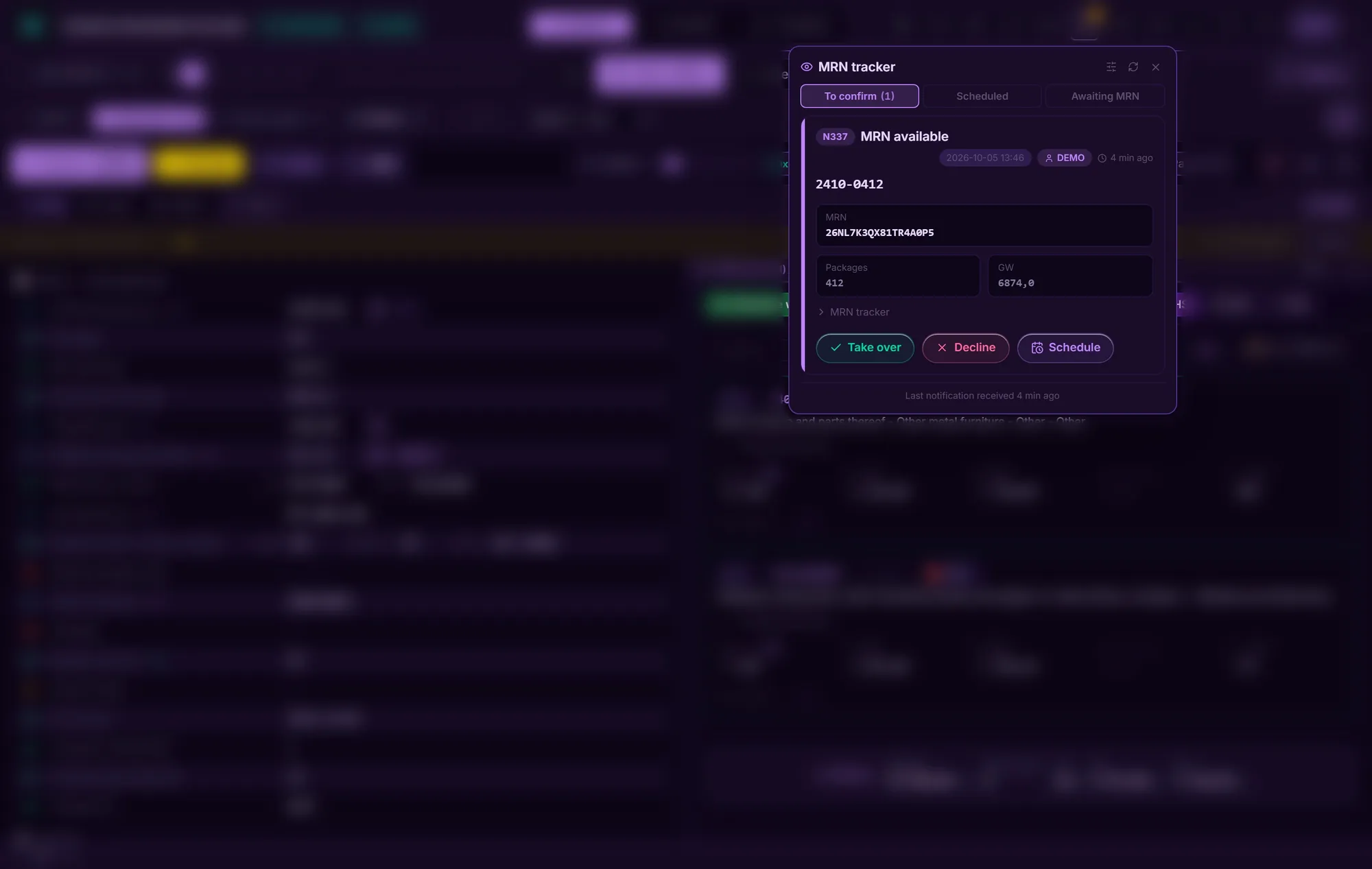
Release is followeduntil customs answersStep 6 of 7The MRN is followed until the administration answers. As soon as release comes through, the person handling the file gets a message. Everyone sets what they want to receive: their own files, a given client's, or nothing at all.
The documents go back outto the file's contactssoonStep 7 of 7On release, the import or export declaration goes back out to predefined recipients. No more sending each release by hand, file by file, reopening your mailbox to gather the documents one at a time.
The sender is recognised, the subject read, the reference spotted. The flow is decided at that moment. These flows are set and controlled by your declarants: they are the ones who say which sender goes to which file and which documents are expected there.
Attachments with unreadable names, a file called « BL » that actually holds the scan of the invoice: you have to open everything to know what you have. Here every document is recognised for what it really is, renamed and filed where it belongs. You open a file that is already sorted instead of sorting a mailbox.
Invoice, packing list, bill of lading, arrival notice, EUR.1, e-mail, spreadsheet: they come in as they are and in numbers. Several invoices and several packing lists on a single file, which becomes the rule as soon as a shipment is grouped. Every value keeps the trace of the document it came from, and when two documents contradict each other the file says so instead of choosing in silence.
There are two paths. IC Auto Encoder enters data on screen, as an operator would, after calibration for a supported application. Connecting another application is arranged with you. With our Instant Clearance suite, still in development, fields will be populated directly through an API. In both cases, you retain review and approval.
From extraction onwards, every document is filed under its real name, with the file reference and its date. During a post-clearance audit, the document being asked for is found in seconds instead of being hunted for in a mailbox.
The MRN is followed until the administration answers. As soon as release comes through, the person handling the file gets a message. Everyone sets what they want to receive: their own files, a given client's, or nothing at all.
On release, the import or export declaration goes back out to predefined recipients. No more sending each release by hand, file by file, reopening your mailbox to gather the documents one at a time.
3× faster than a declarant checking and typing by hand*
All seven steps in one program, and each one can be adjusted by hand, effortlessly.
*Improvement observed on our test cases, compared with around 15 minutes of manual processing per import case, including document review and calculations. Results depend on the workflow and documents; we measure them with you during the demo.
**Illustrative windows, sample values. The program's real screens are shown further down.
The Instant Clearance suite is in development for IDMS imports, AES exports, NCTS transit and invoicing. Belgium deployed NCTS phase 6 on 1 April 2026; structured electronic invoicing has applied to relevant Belgian B2B transactions since January 2026. The features below describe this upcoming suite.
Flagging a missing field before sending is nothing remarkable: customs software already does it. What saves time is saying which one, where it sits in the declaration, and taking you straight to it instead of leaving you to hunt for it.
And most of them are not missing, because nobody types them: the values are read from your documents, then injected through an API into the declaration. Each one carries its source: the gross weight comes from the bill of lading, the value from the invoice, the origin from the EUR.1, and the file shows you that. Whatever is still missing, the program points out: the field, its place in the declaration and the rule that requires it.
A file that is ready leaves when it has to: at the time you set, or as soon as the goods are presented. You prepare in the morning, the program lodges at the right moment.
A scheduled file says whether it will be able to leave: green when it is complete, red as soon as a field is missing. A shipment nobody is watching is precisely the one whose gap has to show in advance, not at departure time.
A file that leaves without you has to come back to you. As soon as the administration grants release, the person handling the file gets a message. Everyone sets what they want to receive: their own files, a given client's, or nothing at all.
Nothing is ever re-sent on its own: a shipment that comes back rejected is shown to you before it is played again.
The Belgian tariff is pulled in every day, without anyone having to trigger it. Duties are calculated heading by heading, on the rates in force that day.
Third-country duty, preferential agreements, national measures, applied in the order the administration applies them.
VAT rates are not loaded yet: the standard rate applies and the file says so instead of keeping quiet about it.
The administration's monthly rates, applied to the amounts in foreign currency.
Disbursements, services and advanced costs gather as the file progresses. The invoice is prepared from the declaration itself. No more re-entering in a second tool, no more gap between what was declared and what is invoiced.
Peppol BIS Billing 3.0 · UBL 2.1, aligned with EN 16931
What is advanced on your client's behalf and what pays you do not follow the same VAT regime. The invoice tells them apart on its own.
Every submission traced, every status dated
A customs declaration carries your clients, your suppliers, your prices. That is sensitive commercial information and it is treated as such: one instance per company, no shared storage.
One instance per company. No storage shared between clients.
An audit trail records who changed what and when. Retention periods and access arrangements are agreed with your company.
Named accounts, rights set per user
Continuous on our servers, with a restore that has been tested. And you keep your own copies of your declarations if you wish
Development conducted to ISO 9001 and 27001 requirements
Documents, the queue, the declaration and TARIC in one place. An interface designed to remain readable throughout the working day, from receiving documents to reviewing the declaration.
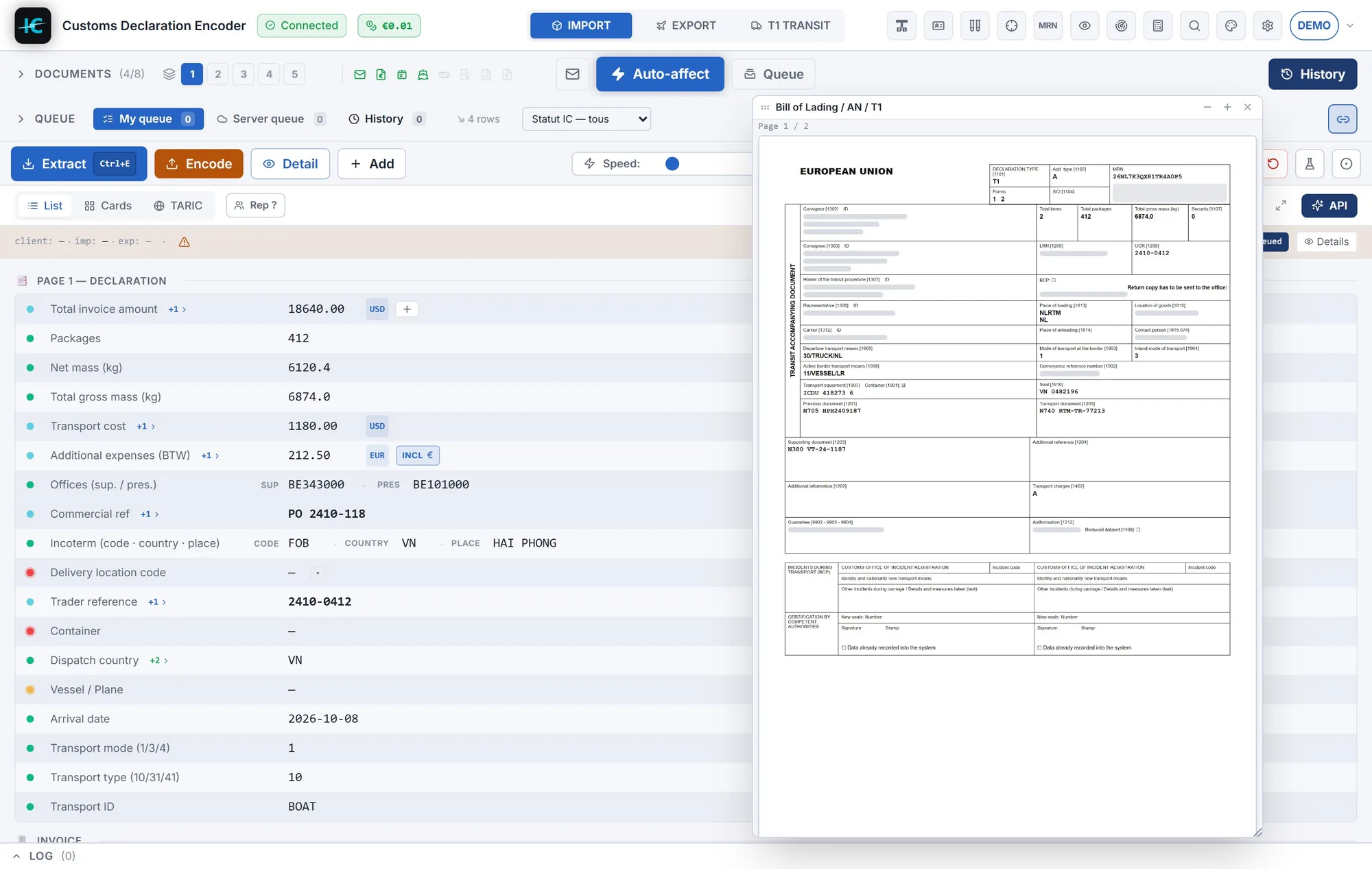
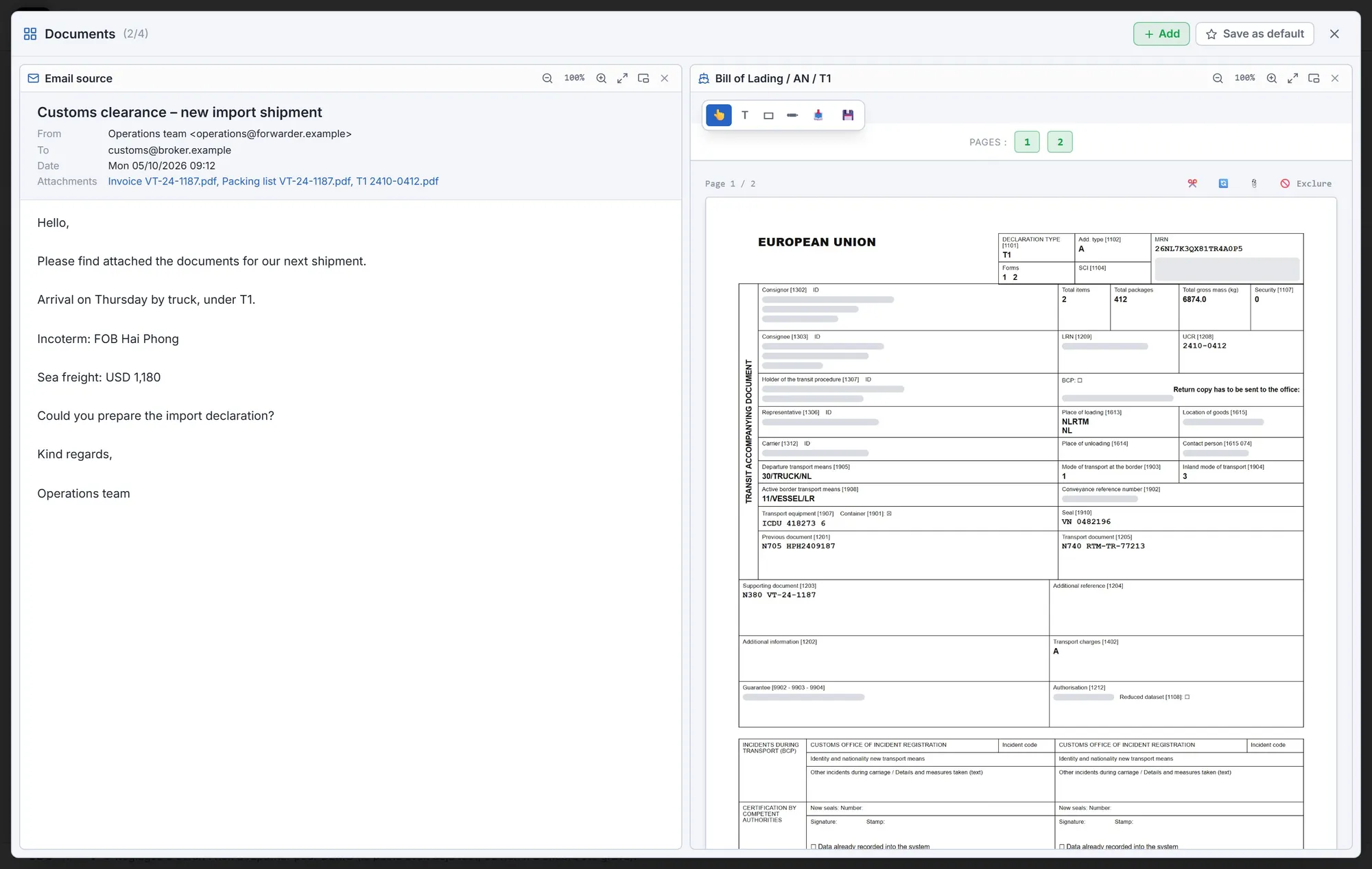

The words on screen are those of the declaration, not those of a piece of software. We get you started on your own files, with you, until your declarants work on their own.
Every value carries its source document and a confidence score. As soon as the file comes in, the discrepancies are computed: packages that don't add up, a missing weight, an HS code that no longer exists. The exact field is pointed out, not the whole file.
It does not replace the tool you have: it plugs into it. The calibration is done and proven on one customs program; for another, it is set up on request.
Release, inspection, a case that needs attention: important updates reach your team's messaging app. Each person chooses which notifications to receive.
Every document opens in the screen, in its own format: PDF, Excel, email… It stays beside the declaration while you review, and all the file's documents can be shown at once, without leaving the screen. No more juggling windows to find where a value came from.
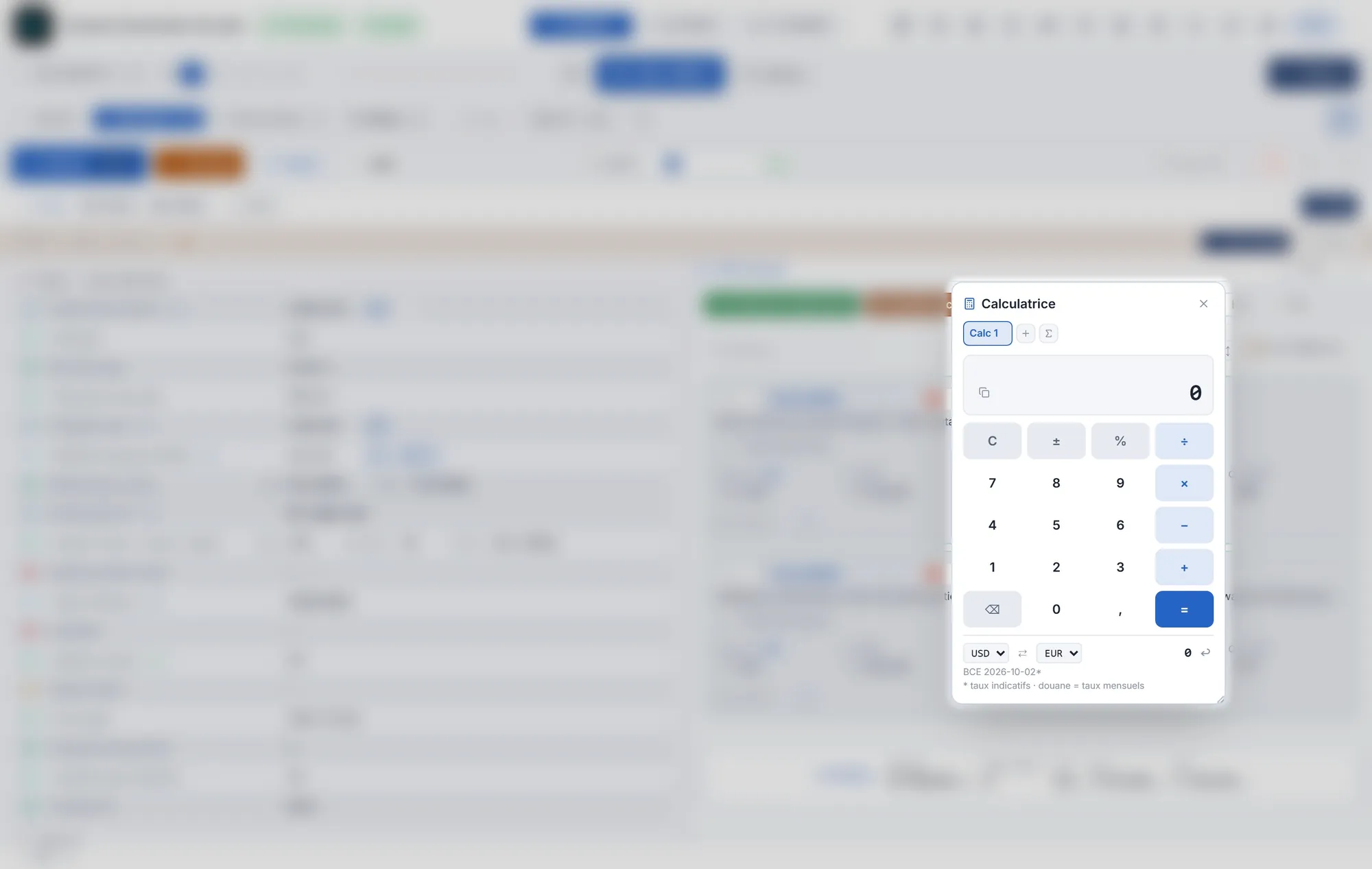
It does everything a professional calculator does, without leaving the screen: percentages, history, one tab per calculation. And it saves time: customs value, duty, VAT and pro rata are already set up, you only fill in the boxes, and your own formulas can be saved. Drag a value from the declaration into it; the result goes back into the right field the same way. Currencies convert at the day's ECB rates, with a reminder that customs itself applies the monthly rate.
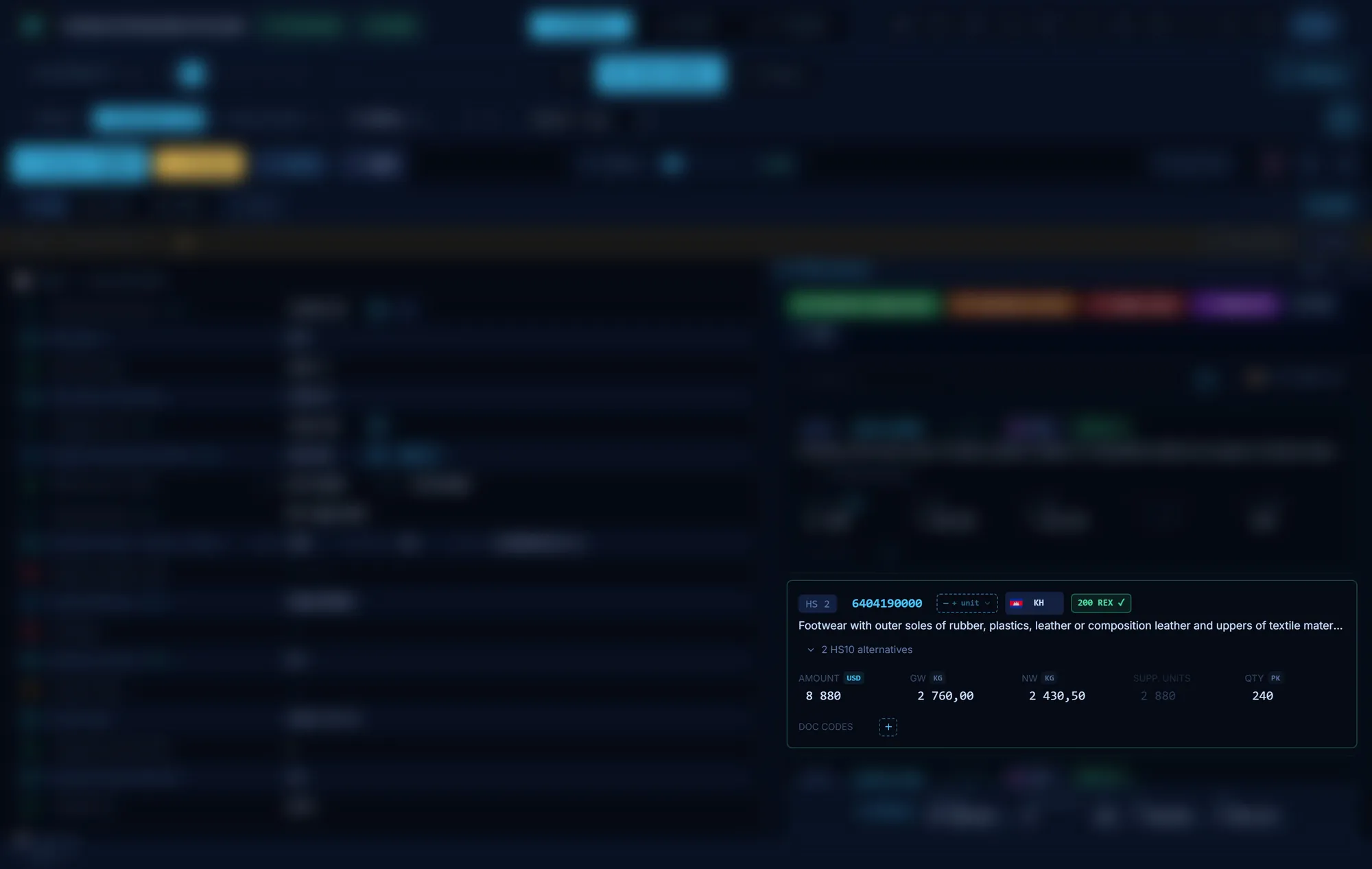
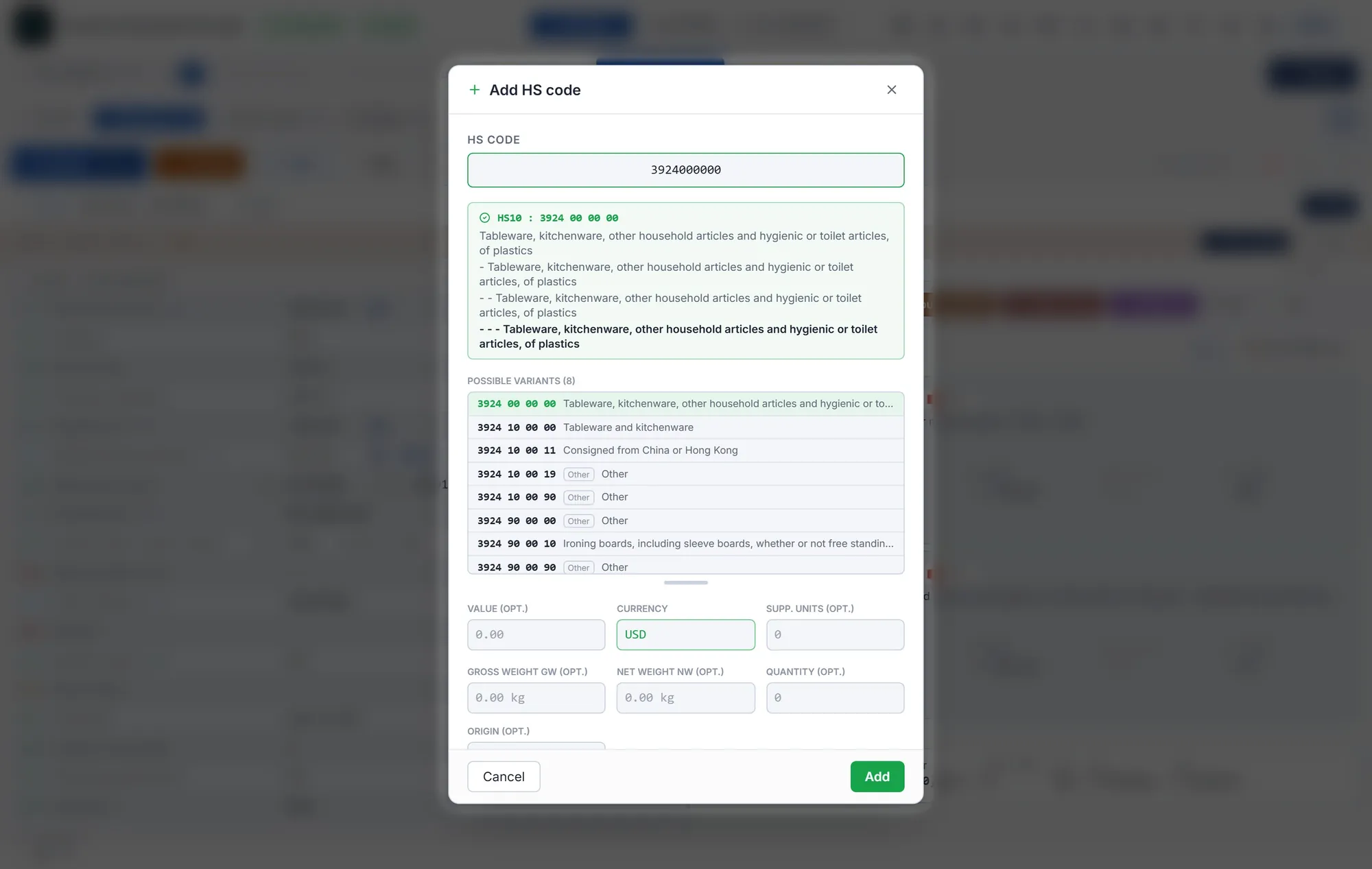
An applicable tariff preference can reduce customs duties. The program flags it along with the supporting evidence required: REX number, origin statement and threshold. Missing or inconsistent details are highlighted before submission. On top of that come the additional documents, and more intelligent features tied to recognising the HS code.
67,000 headings, 330,000 preferential measures, the document codes required: consultable inside the screen, not in a tab on the side, and updated every night.
T1, sea, air: a file often waits on a document that does not exist yet. It stays watched, and as soon as it arrives you are notified: the encoder goes and completes the files concerned by itself.
One account per declarant: their theme, preferences and notifications, on any workstation. But the files are shared: a change made by one is directly visible to the others, and anyone can leave a note on a file for colleagues. The goal is not one declarant working faster alone, but the whole team working faster together.
Physical inspection announced: no more printing twenty pages before heading to the quay. On a Windows tablet or a laptop, you filter the history, open the file, and every document is there: invoice, bill of lading, packing list, release. Pinching magnifies a page like a magnifying glass.
A working screen is judged on its details, and there are too many to fit here: shortcuts, search, checks, per-client settings. The shortest way to see them is to watch the program run on your own files.
Several platforms can read a document, and some do it well. That is not where the difficulty lies. It shows up on the heavy files: fifteen tariff headings, several containers, two documents that do not say the same thing. That is where automatic reading hands back control, and that is exactly where this engine was refined.
The program runs without AI. Extraction relies on engines written for each type of document: they return the same result on every pass, and every value ties back to the exact place it came from.
AI is not in the chain by default. It can be called at specific steps, where a deterministic engine has nothing to read: an unreadable scan, a handwritten note. You decide whether that step is switched on, on a file-by-file basis.
Prepares cases, cross-checks documents and enters data in your existing customs software.
The upcoming suite for import, export and transit declarations, with integrated invoicing.
They are two distinct pieces, and that is deliberate. IC Auto Encoder reads and checks; the other one declares. You can take the second on its own. You can also plug the first into what you already use.
The engine was not designed as a document conversion tool. It was designed by a declarant, for a declarant's day: recognise the client from the file received, route the documents to the right case, compare what they say, and deliver a declaration to review rather than a table to retype.
It works on configured flows: a recurring supplier, a regular client, the documents expected from them. On those flows it delivers a file that is complete, checked and ready to send. And whatever it could not establish, it points out instead of filling in. That second sentence is what separates a tool you supervise from a tool you delegate to. A new flow is set up with you, on your first files.
Customs software settles at the centre of the job. It can become a dependency or stay a tool. That is decided by what you are granted, not by what you are promised.
Import, export, transit and the invoicing that follows, in the same program. One file, from the first document to the invoice.
Your files, your archives and your data export in full, in open formats. If you leave, everything leaves with you.
No minimum term. Access is cut at your request and getting your data back is not negotiated at the moment of leaving.
Everything proposed can be corrected. No field is locked on the grounds that it was filled in automatically, and the full detail stays available behind every value.
A short call. You choose two or three recurring cases that take up your time, with the same suppliers and document types. We start with those workflows.
Nothing to prepare: the files exactly as they reached you will do.
We configure the workflow using your documents, without taking up your team's time. On the second call, you see what was filled in automatically, which discrepancies were flagged and what still needs attention.
You leave with the figure, even if you go no further. If it does not convince you, you will have found out in two calls.
We move on to your other regular clients, one flow at a time. The data lands in the customs software you already use and you validate as usual: your habits do not change.
A supplier always ends up changing the layout of their documents. The flow is then re-tuned on the new ones: that is an adjustment, not a rebuild, and it holds for every file that follows.
Your files and your archives export in full at any time. If you stop, everything leaves with you.
Two short calls. Between them, we tune the flow on your own files and you see the result, whether or not you take it further.
What a customs declarant wants to know before handing files to a program.
No, and that would be the wrong order. We start from where you are: the data pulled from your documents lands in the program you already use and you validate as usual. Your habits do not change, and neither does your responsibility. Its role is to handle the volume of your recurring workflows, so your declarants can spend more time on exceptions, checks and validation.
The day the result convinces you, our own customs software goes further than this first setup: the data goes straight into the declaration, with no intermediate step, and your involvement is almost always limited to reviewing and validating. The demonstration on your own files shows you.
Your files, your archives and your data export in full, in open formats, at any time and without asking. It is the only answer worth anything: a promise of continuity binds only the person who listens to it.
In an instance that belongs to your company alone, hosted in Europe and subject to the GDPR. Nothing is pooled between clients: no common database, no shared data set.
Retention periods for audit logs and documents are agreed with your company according to the data concerned and the applicable requirements.
That is exactly what the demonstration checks, and on your documents, not on an example. Hand us two or three recurring files: we tune the matching flow, then we show you what comes out. The engine works on configured flows: one supplier, the documents expected from them.
That is the job. The rules move all the time: code lists, validation rules, message versions. And the biggest change is already announced: under the EU customs reform, declarations will gradually go through a European customs data hub, by 2034.
It will not take a new program, just the same one adapting: your import and export declarations and your T1s go through whichever channel is in force, on the day it changes, without you having to think about it. It is the program that absorbs the gap, never you.
And if we did not manage it, you would not be trapped: your files and your archives export in full, at any time, in open formats.
For IC Auto Encoder, we start with recurring cases to configure and check the workflows with you. Timing depends on your documents and software and is discussed during the first call. The Instant Clearance customs suite is still in development.
IC Auto Encoder uses a lightweight desktop client connected to the processing service. We help set it up and connect it to your customs software.
Every declarant has their own encoder: files are prepared in parallel, one per session. The program does not wait for one file to be finished before starting the next: while you review, the following ones are being prepared.
The time saved therefore follows the number of declarants as much as the number of files. A team of three does not go three times slower than one person alone.
They do the entering, and they do it well when the data is complete. It rarely is: a weight that is missing, an origin that is absent, an HS code the client does not send. The program plugs in before them as well as after: it completes what is missing from the documents in the file, instead of leaving the declarant to go looking for the piece.
And it knows that client’s history. An origin that changes, an unusual HS code, a value outside its usual range: the discrepancy is flagged while the file is being prepared. Without that history it comes to light on submission, in front of customs, and that is where it costs.
The calendar is public. The Council gave its green light on 3 September 2026: the European Customs Data Hub opens for e-commerce consignments on 1 July 2028, and becomes mandatory for all flows on 1 March 2034.
It changes nothing about what the program does today. It reads your documents, compares them and prepares the declaration; what will change is where that declaration is sent. That part is ours to follow, not yours. And you do not have to wait for 2034 to stop retyping gross weights by hand.
Two calls. On the first, a short one, you hand us two or three recurring files: the ones that come back with the same suppliers and the same documents. We tune the flow on those files, on our own time.
On the second call, you see the result on your own documents: what filled in by itself, what was flagged as doubtful, what is left to do by hand. You leave with a clear picture of what your week loses to typing and checking, whether or not you take it further.
Choose two or three regular clients whose documents you process every week. We prepare the demonstration using those cases so you can assess the result against your day-to-day work.
You see the extracted data, its sources and the checks performed. Together, we measure the time saved and identify what still needs human input.
Request sent. You will receive a personal reply within 24 hours.
Site publisher: William Spreuwers, natural person, established in Belgium. Contact: contact@instantclearance.eu.
Responsible for publication: the natural person named above. The site is hosted in Europe.
The content of this site (text, mock-ups, code and distinctive signs) is protected. The data shown in the screenshots and mock-ups is fictitious: no client file appears in it.
This site presents a piece of software. It constitutes neither customs advice nor a contractual offer: the terms of any engagement are set out in the contract signed between the parties. This site is published in French, English and Dutch; in the event of any divergence, the French version prevails.
1. What the system does
It reads the documents in a file, extracts data from them, compares them against each other and prepares a declaration. It flags what is missing and what does not match. Extraction relies on deterministic engines specific to each type of document; processing by artificial intelligence only takes place at steps where it has been switched on explicitly, and never by default.
2. What it does not do
It does not make decisions on your behalf. A scheduled submission relies on explicit approval and the rules you have configured; scheduling does not replace that approval.
3. Human supervision
Every declaration is validated by a declarant before being transmitted. Responsibility for its content lies with them, and the program is built to give them back the time to read it over.
4. Traceability
Every value carried into a declaration keeps the trace of the document it was taken from. Whatever could not be established is presented as such rather than filled in.
5. Learning
Refinement happens on your own flows, inside your instance. Your documents and your data are not used to improve another client's service and are not pooled.
6. Limits
A plausible but wrong value can pass the formal checks. The program reduces the work of typing and of material verification; it does not replace the declarant's judgement on classification, origin or customs value.
7. Regulatory framework
We follow the development of the European regulation on artificial intelligence and the texts attached to it, as well as the GDPR provisions on automated processing. Any obligations that come to apply to the service will be implemented and this page updated. The classification of the service under that regulation is established with our counsel and is communicated to you on request.
This site sets no cookies and uses no advertising trackers. To know how many people visit it, from which country and where they come from, and which tabs they open, the server keeps a technical log of visits (IP address, browser, page, referring site; the country is derived from the address on the server itself): it is kept for 30 days, after which only anonymous totals remain. Hosting involves technical requests; fonts are served by the site itself. Your language preference is stored in your browser.
Responsibility and use. William Spreuwers is the controller of data received through this website. Contact: contact@instantclearance.eu. The form sends the information you enter: name, company, email, telephone, customs software, declaration volume and message. The receipt date and language are also recorded. This information is used to respond to your enquiry and prepare the demonstration, as steps taken at your request before entering into a contract. Optional fields may be left blank.
Access and retention. William Spreuwers handles your enquiry. Technical providers needed for hosting and message delivery may also process this information; Telegram notifications may be used if that channel is enabled. Data is not sold or used for third-party marketing. Contact correspondence is retained while your enquiry and its follow-up are being handled, then deleted when that process ends, unless a legal obligation applies. Copies of documents entrusted solely for a demonstration are deleted as soon as it ends. Files subsequently processed in IC Auto Encoder or Instant Clearance are governed by contractual provisions and the retention obligations applicable to each document category; this notice does not set a blanket ten-year retention period for them.
You may at any time request access to your data, its rectification or erasure, or object to its processing, by writing to contact@instantclearance.eu. You may also lodge a complaint with the Belgian Data Protection Authority.